
Auto-Invoicing & Payments: Invoices Out When Orders Ship, Payments In on Your Terms
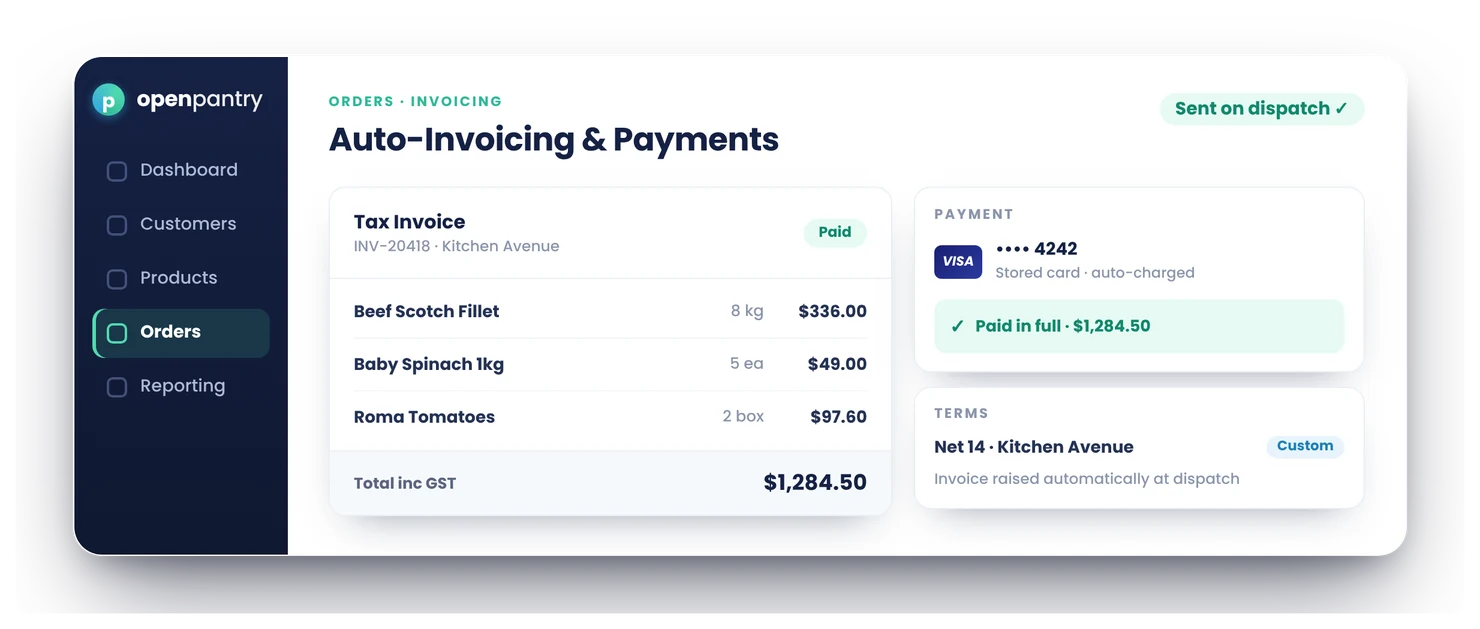
Auto-invoicing creates each invoice from what was actually picked and packed — shorts and substitutions included — the moment the order is dispatched. Payments are collected on the terms you set per customer, with stored cards for venues that pay that way, and everything syncs straight to your accounting system.
- Invoices generated automatically from the packed order — never re-keyed
- Per-customer payment terms; stored cards via Stripe
- Credit notes raised and synced without double entry
★★★★★ Trusted by 600+ suppliers across Australia



Invoicing by hand is a cash-flow tax

Invoices keyed from delivery dockets — hours of work and every keystroke a risk

The invoice says 10, the truck delivered 8 — now you’re writing credits

Payment terms tracked in heads; late payers chased by phone

Every invoice typed twice: once in your system, once in Xero
From Packed Order to Paid Invoice
Order ships, invoice exists
Generated automatically from the final packed order: shorts, substitutions and pack sizes all correct on the invoice. No re-keying.
Terms apply per customer
COD, 7, 14, 30 days — whatever you’ve agreed with each venue is what the invoice carries.
Payments collected
Customers with stored cards are charged per your arrangement; account customers pay on terms.
Books stay in sync
Invoices, payments and credit notes sync two-way with your accounting system.
Free trial · Cancel anytime
The invoice matches the truck
Because invoicing sits downstream of Digital Pick & Pack, the invoice is generated from what was actually packed — a short-picked line is invoiced short automatically. The #1 source of credit requests disappears.

Per-customer terms, enforced
Every venue on its own terms. Terms carry through to the invoice and your receivables view, so who-owes-what-when is a report, not a memory exercise.

Stored cards via Stripe
Venues that pay by card can have a card securely stored (PCI-compliant, via Stripe) and charged per your arrangement — payment collection without the phone tag.

Credit notes without the circus
Raise a credit against an invoice and it flows through to your accounting system like everything else — allocated properly, not floating as a mystery adjustment.

- More product lines purchased
- 24%
- Your always-on branded store and app put your full range in front of customers, so baskets grow.
- Less order-processing cost
- 95%
- AI order capture and auto-invoicing remove the manual keying between order and books.
- Fewer picking errors
- 80%
- Tablet pick & pack with FEFO lot and expiry tracking catches shorts and wrong items before they ship.
Real gains suppliers report after moving ordering, fulfilment and invoicing onto Open Pantry.
Invoices and Payments Sync Straight to Your Books
Trusted by M&J Chickens
M&J Chickens use Open Pantry to move ordering out of calls and messages and into one digital workflow — giving customers a smooth ordering experience and giving the team fewer errors and less admin.
“With Open Pantry, we launched our own fully branded ordering app — it’s helped us protect our customer base, move to digital ordering, and deliver a much better experience to our venues.”

Your ledger doesn’t know what the warehouse packed
Invoicing out of your accounting system means someone re-keys every order — and the invoice can’t know about the short pick or the substitution that happened at 5am. Invoicing where fulfilment happens gets the numbers right at the source; the accounting sync then keeps Xero perfect without anyone typing.

Questions Suppliers Ask About Auto-Invoicing & Payments
How does automated invoicing work — when is the invoice created?+
Will the invoice match what was actually packed, including out-of-stocks and substitutions?+
Can I set different payment terms per customer?+
Can I store a customer’s card and charge it automatically?+
Is storing card details secure and PCI compliant?+
What are the transaction fees?+
Can some customers pay upfront while others stay on account?+
How do credit notes work?+
Do invoices sync to my accounting system automatically?+
Does the invoice show pack sizes and unit prices correctly?+
Can customers see their invoices?+
Will this actually improve my cash flow?+
Works Even Better With
Accounting Sync
Invoices, payments and credit notes sync two-way with Xero, MYOB, QuickBooks, Sage and Zoho.
Explore →Routes & Live ETAs
Dispatched orders trigger the invoice — delivered today, billed today.
Explore →Credits & Returns
Raise a credit against any invoice — apply it, leave it on account or refund, then it syncs.
Explore →Put Your Cash Flow on Autopilot.
Join 600+ Australian suppliers running their ordering, fulfilment and invoicing on Open Pantry.
Setup done for you · Cancel anytime · Your data stays yours