
Credits & Returns: Raise, Allocate and Sync — No Double Entry, No Chasing
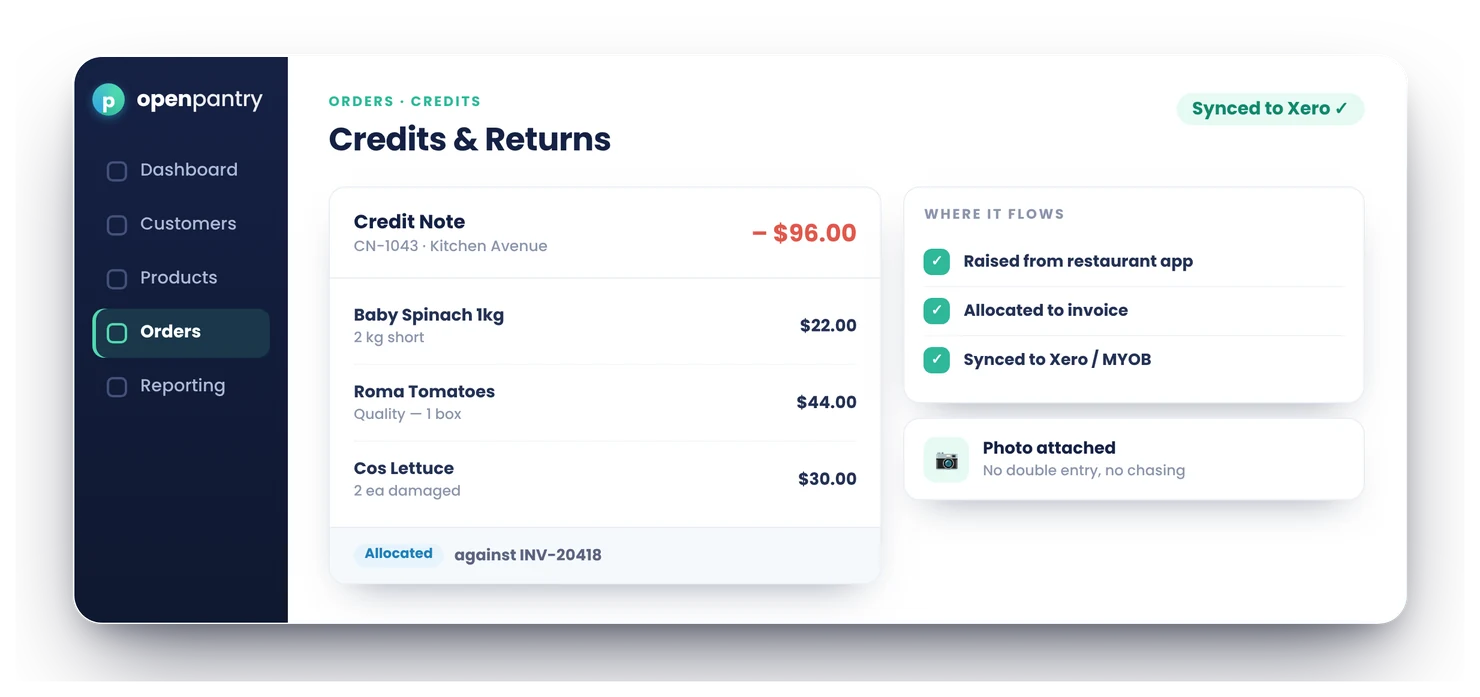
Credits & Returns handles the whole credit note in one place: raise a credit against an order line by line, take credit requests straight from your customers, settle it by applying to an invoice, leaving it on account or refunding — and let it sync to your accounting system as a proper credit note. No hand-typed adjustments in two systems, no floating credits nobody can find.
- Raise a credit against the original order, line by line, GST inherited
- Customers request credits from their order; you approve, part-approve or decline
- Apply to an invoice, leave on account, or refund — then it syncs to your books
★★★★★ Trusted by 600+ suppliers across Australia



Credits are where the paperwork falls apart

A credit scribbled on a docket, typed into your system, then re-typed into Xero — or forgotten

Customers chase a credit for weeks because nobody can find where it went

A return comes back but the credit note never ties to the original invoice

GST on the credit worked out by hand — and not the way the original line was taxed
How Credits & Returns Work
Start from the order
Raise a credit against the original order and pick the lines and quantities — GST is inherited from each line, not guessed.
Or take the request
A customer’s credit request arrives against their order with the reason; you approve it, approve part of it, or ask for more.
Issue the credit note
The credit is issued with its own sequential credit-note number, recorded against the customer.
Settle and sync
Apply it to the unpaid invoice, leave it on account, or refund — and it syncs to your accounting system.
Free trial · Cancel anytime
Raise a credit in a couple of taps
Start from the original order, choose the lines and quantities to credit, and the credit note is built from the real order — the same prices, the same per-line GST. No re-keying, no manual tax maths, and a sequential credit-note number for your records.

Customers request credits from their order
Venues can request a credit straight from their order history with a reason and the affected lines. It arrives as a Credit Request for your team to approve, approve in part, or decline — with a clear status the customer can see, so nobody has to chase.

Settle it your way
Apply the credit to the customer’s unpaid invoice, leave it on account for their next order, or refund it — by card through Stripe or manually. Customer credit balances are tracked, so on-account credit is used, not lost.
- Apply to an invoice or leave on account
- Refund by card (Stripe) or manually

Syncs to your accounting
An issued credit syncs to your accounting system as a proper credit note — allocated against the right invoice where your provider supports it — so the credit exists once, in both systems, without anyone typing it twice.

- More product lines purchased
- 24%
- Your always-on branded store and app put your full range in front of customers, so baskets grow.
- Less order-processing cost
- 95%
- AI order capture and auto-invoicing remove the manual keying between order and books.
- Fewer picking errors
- 80%
- Tablet pick & pack with FEFO lot and expiry tracking catches shorts and wrong items before they ship.
Real gains suppliers report after moving ordering, fulfilment and invoicing onto Open Pantry.
Credits Flow Through to Your Books

Trusted by M&J Chickens
M&J Chickens use Open Pantry to move ordering out of calls and messages and into one digital workflow — giving customers a smooth ordering experience and giving the team fewer errors and less admin.
“With Open Pantry, we launched our own fully branded ordering app — it’s helped us protect our customer base, move to digital ordering, and deliver a much better experience to our venues.”

Why not just handle credits by hand?
Hand-handled credits are where money quietly leaks: a credit issued in your system but never entered in your books, a return that never ties back to its invoice, a GST figure worked out differently from the original line. Handling the credit where the order lives means it’s built from real data, allocated to the right invoice, and synced once — so the credit is right, and it’s found.

Questions Suppliers Ask About Credits & Returns
How do I raise a credit note in Open Pantry?+
How is GST handled on a credit?+
Can my customers request a credit themselves?+
Can I approve only part of a credit request?+
How do I apply a credit to an invoice?+
Can I refund a credit instead of applying it?+
Does a credit reduce what the customer owes automatically?+
Does the credit note sync to my accounting system?+
Which accounting systems is credit-note sync available for?+
Do credits and returns tie back to the original order and invoice?+
Can a short pick or a return both become a credit?+
Which plan includes credits and returns?+
Works Even Better With
Auto-Invoicing & Payments
Credits are raised against the invoices auto-generated from packed orders, and settle against them.
Explore →Accounting Sync
Issued credits sync to your ledger as proper credit notes, allocated to the right invoice.
Explore →Digital Pick & Pack
Shorts billed short at dispatch mean fewer credits to raise in the first place.
Explore →Make Credits Right — and Findable.
Join 600+ Australian suppliers running their ordering, fulfilment and invoicing on Open Pantry.
Setup done for you · Cancel anytime · Your data stays yours