
Accounting Sync: Two-Way With Xero, MYOB, QuickBooks, Sage & Zoho Books
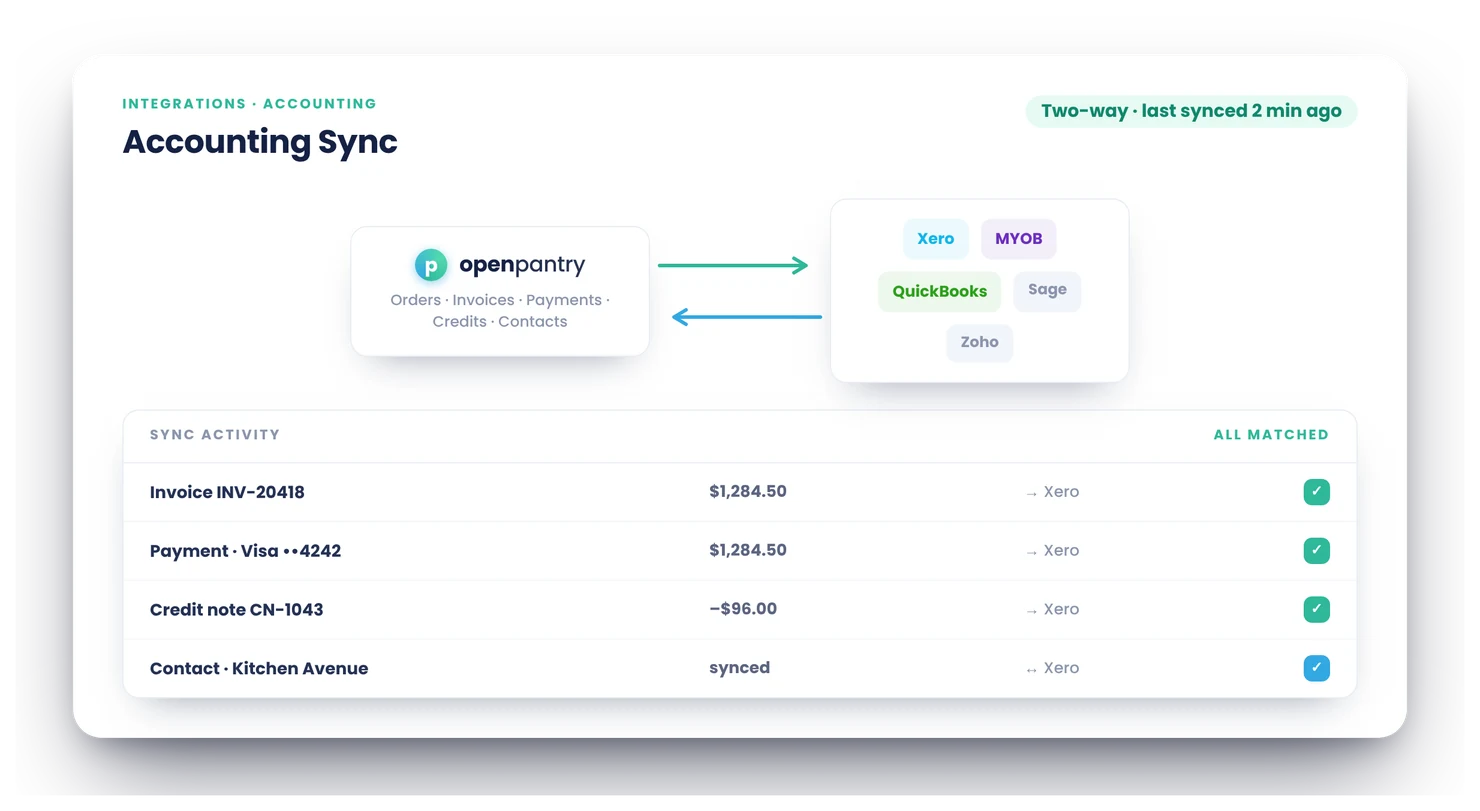
Open Pantry syncs two-way with Xero, MYOB, QuickBooks, Sage and Zoho Books: invoices, payments and credit notes flow into your accounting system automatically, mapped to your chart of accounts and tax settings — and nothing gets typed twice. Your platform runs operations; your accounting system stays the clean, current ledger.
- Five major accounting providers, synced two-way
- Invoices, payments, credit notes and vendor bills — no double entry
- Mapped to your chart of accounts and GST settings, matched to existing contacts
★★★★★ Trusted by 600+ suppliers across Australia



Re-keying invoices is a part-time job nobody applied for

Every invoice typed once in your system and again in Xero or MYOB

Duplicated contacts, mismatched totals, reconciliation archaeology at BAS time

Credits recorded in one system and forgotten in the other

Your bookkeeper billing hours to fix what a sync should have prevented
Connect Once, Then Stop Thinking About It
Connect your provider
Authorise Xero, MYOB, QuickBooks, Sage or Zoho Books and map your accounts: which income account sales go to, which account purchases post to, your tax defaults.
Match what exists
Customers and products are matched against your existing accounting records so the sync updates rather than duplicates.
Everything flows
Invoices as orders complete, payments as they’re collected, credit notes as they’re raised — automatically, in the right accounts, with the right GST.
Both directions
It’s a two-way sync, so your accounting system and Open Pantry stay consistent instead of drifting apart.
Free trial · Cancel anytime
Five providers, one behaviour
Xero, MYOB, QuickBooks, Sage and Zoho Books — the same clean sync semantics whichever ledger you run. Most competitors stop at one or two providers, often push-only.

Your chart of accounts, your rules
Choose the income account sales post to and the purchases/COGS account vendor bills post to. Tax defaults follow your accounting settings — including GST-free food lines.

Credit notes done properly
Credits sync as first-class documents and are allocated against the right invoice — not floating negative amounts your bookkeeper has to interpret.

Built to not duplicate
Contacts and records are matched before anything is created, and sync records track what went where — the boring engineering that separates a good sync from a duplicate factory.

- More product lines purchased
- 24%
- Your always-on branded store and app put your full range in front of customers, so baskets grow.
- Less order-processing cost
- 95%
- AI order capture and auto-invoicing remove the manual keying between order and books.
- Fewer picking errors
- 80%
- Tablet pick & pack with FEFO lot and expiry tracking catches shorts and wrong items before they ship.
Real gains suppliers report after moving ordering, fulfilment and invoicing onto Open Pantry.
Connects to the Ledger You Already Run
Trusted by M&J Chickens
M&J Chickens use Open Pantry to move ordering out of calls and messages and into one digital workflow — giving customers a smooth ordering experience and giving the team fewer errors and less admin.
“With Open Pantry, we launched our own fully branded ordering app — it’s helped us protect our customer base, move to digital ordering, and deliver a much better experience to our venues.”

Bolt-on connectors sync invoices. Platforms sync the business.
Generic connector tools push invoice PDFs at your ledger after the fact — no picked-quantity accuracy, no credit allocation, no vendor bills, and every edge case is your problem. A native sync built into the platform that created the invoice knows the whole story: what shipped, what was credited, what account it belongs in.

Questions Suppliers Ask About Accounting Sync
Which accounting systems does Open Pantry integrate with?+
Is the sync two-way?+
Do invoices sync automatically, or do I push them manually?+
Will it create duplicate contacts or invoices in my accounting system?+
Can I map sales and purchases to my own chart of accounts?+
How is GST handled?+
Do credit notes sync too?+
Can vendor/supplier bills sync as well?+
Do payments reconcile against the right invoice?+
How long does setup take, and should my bookkeeper be involved?+
What happens to my existing records when I connect — is anything overwritten?+
Which plan includes accounting integrations?+
Works Even Better With
Auto-Invoicing & Payments
The invoices, payments and credit notes that sync are generated automatically from packed orders.
Explore →Purchasing & Auto-POs
Approved vendor bills post to your ledger as accounts payable, in your chosen purchases account.
Explore →Credits & Returns
Issued credit notes sync to your ledger as proper credits, allocated to the right invoice.
Explore →Stop Re-keying Invoices. Connect Once.
Join 600+ Australian suppliers running their ordering, fulfilment and invoicing on Open Pantry.
Setup done for you · Cancel anytime · Your data stays yours